
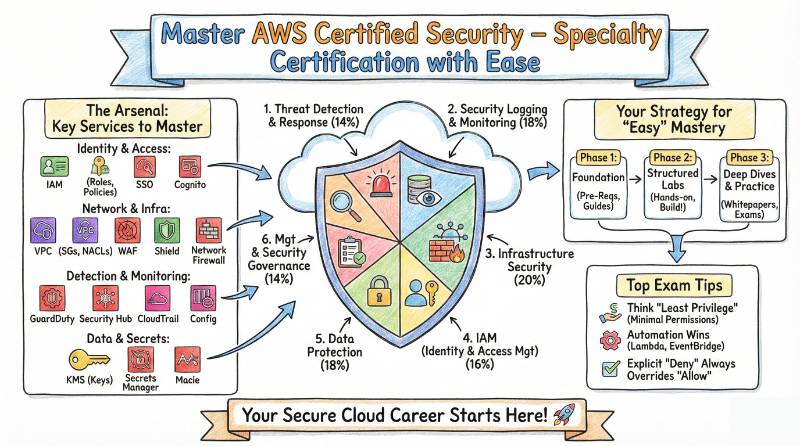
Introduction
The AWS Certified Security – Specialty certification is one of the most prestigious certifications for cloud security professionals. In a rapidly evolving field like cloud security, where protecting data, managing access, and ensuring compliance are top priorities, this certification validates your ability to secure AWS environments and manage critical cloud security challenges. Whether you’re a security engineer, cloud architect, or DevSecOps professional, this certification equips you with the specialized knowledge to secure AWS infrastructures effectively.
In this guide, we’ll break down the AWS Certified Security – Specialty certification, its benefits, the skills you’ll acquire, and how you can successfully prepare for the exam.
What is AWS Certified Security – Specialty?
The AWS Certified Security – Specialty certification is a professional-level credential designed for individuals who want to demonstrate their expertise in securing AWS cloud environments. This certification focuses on protecting data, managing identity, securing infrastructure, responding to incidents, and ensuring compliance with security best practices in AWS. With more organizations shifting to cloud-based operations, this certification provides a competitive edge in the field of cloud security.
Who Should Take This Certification?
This certification is ideal for professionals who want to focus on security within AWS environments. It is especially useful for:
- Security Engineers
- Cloud Architects
- DevSecOps Engineers
- AWS Cloud Professionals
- Compliance and Risk Managers
If you’re responsible for securing cloud infrastructure, managing AWS environments, or ensuring compliance within AWS, this certification is an essential step in building and validating your security skills.
Skills You’ll Gain
Earning the AWS Certified Security – Specialty certification helps you gain the following key skills:
- Identity and Access Management (IAM): Create and manage IAM policies, roles, and permissions to secure AWS services.
- Data Protection: Implement data encryption and key management in AWS services like KMS, S3, and EC2.
- Infrastructure Security: Design secure AWS environments, manage network security (VPCs, security groups), and enforce firewalls.
- Incident Response: Implement processes to detect, respond, and recover from security incidents.
- Compliance and Security Monitoring: Set up monitoring tools like AWS CloudTrail and GuardDuty to track activity and ensure compliance with security policies.
- Risk Management: Understand cloud risk factors and how to mitigate them effectively in AWS environments.
Real-World Projects You Should Be Able to Do
Upon earning the certification, you’ll be capable of handling real-world security projects, such as:
- Designing a secure IAM strategy for users and roles within AWS environments.
- Implementing encryption mechanisms for sensitive data using AWS KMS and S3 encryption.
- Securing a VPC by configuring subnets, security groups, and NACLs to control traffic.
- Setting up AWS CloudTrail and GuardDuty to monitor AWS environments for suspicious activities.
- Building an incident response framework for detecting, analyzing, and mitigating security incidents.
- Ensuring compliance with AWS security standards and frameworks (SOC 2, HIPAA, GDPR).
Preparation Plan
7-14 Days (Quick Overview)
- Review AWS security documentation and get familiar with key services like IAM, KMS, and CloudTrail.
- Focus on understanding the IAM policies and data encryption techniques used in AWS.
- Go through AWS security whitepapers and key resources to understand security best practices.
30 Days (Intermediate Plan)
- Dive deeper into incident response practices and network security configurations.
- Practice with AWS security tools like AWS Shield, GuardDuty, and VPC.
- Take practice exams to assess your understanding of security services and incident handling.
60 Days (Advanced Study)
- Set up mock environments to practice securing cloud architectures.
- Focus on security monitoring tools and real-world AWS security case studies.
- Take mock tests and go through detailed review sessions to ensure you’re ready for the exam.
Common Mistakes
While preparing for the AWS Certified Security – Specialty exam, here are some common mistakes to avoid:
- Skipping IAM Security: Not understanding IAM policies and roles in-depth can lead to security flaws.
- Neglecting Data Protection: Forgetting to implement encryption for sensitive data, both in transit and at rest, is a major oversight.
- Underestimating CloudTrail and GuardDuty: Failing to use monitoring tools to detect and prevent security issues is a big mistake.
- Not Practicing Hands-on: Without hands-on experience, it’s difficult to apply theoretical knowledge to real-world scenarios.
- Relying solely on theoretical knowledge: The exam requires practical application, so hands-on labs and practice exams are essential.
Best Next Certification After This
Once you have successfully earned the AWS Certified Security – Specialty, you can expand your expertise with the following certifications:
- AWS Certified Solutions Architect – Professional: Ideal for those looking to deepen their architecture skills and design highly secure, scalable systems on AWS.
- Certified Cloud Security Professional (CCSP): A cross-cloud security certification covering more general cloud security concepts beyond AWS.
- AWS Certified Advanced Networking – Specialty: Focus on the security and design of networking within AWS environments.
Choose Your Path
After completing the AWS Certified Security – Specialty, you can continue your career development by pursuing one of these six learning paths:
DevOps Path
- Automate security processes and ensure security best practices throughout the CI/CD pipeline.
DevSecOps Path
- Embed security into your DevOps processes, integrating security controls at every stage of the development lifecycle.
SRE Path (Site Reliability Engineering)
- Focus on designing reliable, secure systems for production environments while keeping performance and security in mind.
AIOps/MLOps Path
- Leverage AI and machine learning technologies to enhance cloud security automation and monitoring.
DataOps Path
- Secure and manage data pipelines, ensuring data protection and compliance throughout the data lifecycle.
FinOps Path
- Learn to manage cloud financials while ensuring security measures are in place to protect sensitive financial data.
Role → Recommended Certifications
| Role | Recommended Certifications |
|---|---|
| Security Engineer | AWS Certified Security – Specialty, AWS Solutions Architect |
| Cloud Engineer | AWS Certified Security – Specialty, AWS Certified Developer |
| Platform Engineer | AWS Certified Security – Specialty, AWS Certified SysOps Admin |
| DevSecOps Engineer | AWS Certified Security – Specialty, Certified Kubernetes Security Specialist |
| Data Engineer | AWS Certified Big Data Specialty, AWS Certified Security – Specialty |
| Engineering Manager | AWS Certified Security – Specialty, AWS Certified Solutions Architect |
Frequently Asked Questions
1. How difficult is the AWS Certified Security – Specialty exam?
The exam is challenging and requires hands-on experience with AWS security services.
2. What is the passing score for the exam?
A minimum score of 750 out of 1000 is required to pass.
3. How long should I prepare for the exam?
Most candidates take 1-2 months for preparation.
4. What is the format of the exam?
The exam includes 65 multiple-choice questions and lasts for 170 minutes.
5. What resources should I use to prepare?
Use AWS documentation, practice exams, hands-on labs, and online courses.
6. How long is the certification valid for?
The certification is valid for three years.
7. Can I take the exam online?
Yes, the exam is available online with remote proctoring.
8. What happens if I fail the exam?
You can retake the exam after a 14-day waiting period.
9. What are the main topics covered in the exam?
The exam covers IAM, data protection, network security, incident response, and compliance.
10. How does this certification benefit my career?
It demonstrates your expertise in securing AWS environments, making you more competitive in the job market.
11. What is the next certification I should pursue?
Consider pursuing AWS Certified Solutions Architect – Professional or Certified Cloud Security Professional (CCSP).
12. What is the difficulty level of the certification exam?
The exam is of moderate to high difficulty and requires both practical experience and theoretical knowledge.
Frequently Asked Questions on AWS Certified Security – Specialty
1. What is the AWS Certified Security – Specialty certification?
The AWS Certified Security – Specialty certification is designed to validate your skills in securing AWS environments. It covers topics such as identity and access management (IAM), data protection, network security, incident response, and compliance within AWS. This certification is intended for professionals who are involved in securing AWS cloud infrastructure.
2. What are the prerequisites for the AWS Certified Security – Specialty exam?
There are no mandatory prerequisites, but AWS recommends having a foundational understanding of AWS services, particularly IAM, VPC, and encryption techniques. Hands-on experience with AWS security services will be beneficial in preparing for the exam.
3. How long should I take to prepare for this exam?
On average, candidates take 1-2 months to prepare for the exam, depending on their experience with AWS security. This time should be used for studying key AWS security services, practicing real-world scenarios, and taking mock exams.
4. What is the exam structure for AWS Certified Security – Specialty?
The exam consists of 65 multiple-choice questions and lasts 170 minutes. The questions are designed to test your knowledge and practical experience in securing AWS environments, including identity management, data protection, and security monitoring.
5. How much does the AWS Certified Security – Specialty exam cost?
The exam fee for AWS Certified Security – Specialty is $300 USD. This includes the cost of the exam itself, but it’s important to check for any additional charges related to retakes or other services.
6. Can I take the AWS Certified Security – Specialty exam online?
Yes, the AWS Certified Security – Specialty exam can be taken online through remote proctoring. You will need a reliable internet connection, a webcam, and a private space to take the exam.
7. How difficult is the AWS Certified Security – Specialty exam?
The exam is considered moderately difficult and requires both theoretical knowledge and hands-on experience with AWS security services. Candidates are expected to understand advanced security concepts and best practices for AWS environments.
8. What resources should I use to prepare for the AWS Certified Security – Specialty exam?
To prepare, use resources like AWS documentation, AWS whitepapers, and hands-on labs. You can also take online courses from reputable providers like DevOpsSchool and Cotocus for structured training and practice exams.
Next Certifications to Take
Same Track:
- AWS Certified Solutions Architect – Professional
Cross-Track:
- Certified Cloud Security Professional (CCSP)
Leadership Track:
- AWS Certified Advanced Networking – Specialty
Top Institutions Offering AWS Certified Security – Specialty Training
DevOpsSchool
DevOpsSchool offers comprehensive training focused on AWS security practices and certification readiness. Their courses include hands‑on labs, real-world scenarios, and expert guidance. You’ll learn how to secure AWS services, manage IAM, implement encryption, monitor systems, and prepare effectively for the exam.
Cotocus
Cotocus delivers practical AWS security training with a strong emphasis on real‑world projects and hands‑on practice. Their curriculum covers key services like IAM, GuardDuty, CloudTrail, KMS (key management), and network security. Students benefit from live sessions and mock exams for deeper understanding.
ScmGalaxy
ScmGalaxy provides end‑to‑end AWS security training, blending classroom sessions with practical exercises. They focus on security best practices, compliance, threat detection, and incident response. Their training helps candidates understand cloud security fundamentals while building exam confidence.
BestDevOps
BestDevOps offers flexible AWS security certification courses with both instructor‑led and self‑paced options. Their training includes real‑world use cases, practical labs, and regular assessments, ensuring that learners gain both the knowledge and confidence needed to secure AWS environments successfully.
devsecopsschool.com
DevSecOpsSchool specializes in integrating security into DevOps practices. Their AWS Certified Security – Specialty training emphasizes secure software delivery pipelines, threat modeling, automation of security controls, and hands‑on application of AWS security tools, making it ideal for DevSecOps professionals.
sreschool.com
SRESchool combines Site Reliability Engineering concepts with AWS security training. Their program focuses on building reliable, scalable, and secure cloud systems. Students learn how to secure infrastructure, automate security operations, and apply incident response strategies in AWS environments.
aiopsschool.com
AIOpsSchool blends AI‑driven automation with AWS security practices. Their courses cover automated threat detection, intelligent monitoring, and proactive risk mitigation. Students gain exposure to AI tools that help secure cloud deployments and improve operational efficiency.
dataopsschool.com
DataOpsSchool focuses on securing data‑centric AWS environments. Their training covers data protection techniques, secure data pipelines, encryption, compliance, and governance. This is especially useful for professionals working with data lakes, analytics platforms, and secure cloud storage.
finopsschool.com
FinOpsSchool integrates cloud financial operations with security best practices. Their training helps learners understand how to balance cost optimization with security requirements. Students learn secure cloud budgeting, risk assessment, access control policies, and how to design cost‑efficient secure architectures.

